👤 Customer Experience

Give Every Solar Customer Their Own Live Project Portal

Stop answering “where is my installation?” calls. SaaSSolar’s customer portal gives homeowners and business owners real-time visibility into their solar project — from signed contract to final inspection — with zero extra work from your team.
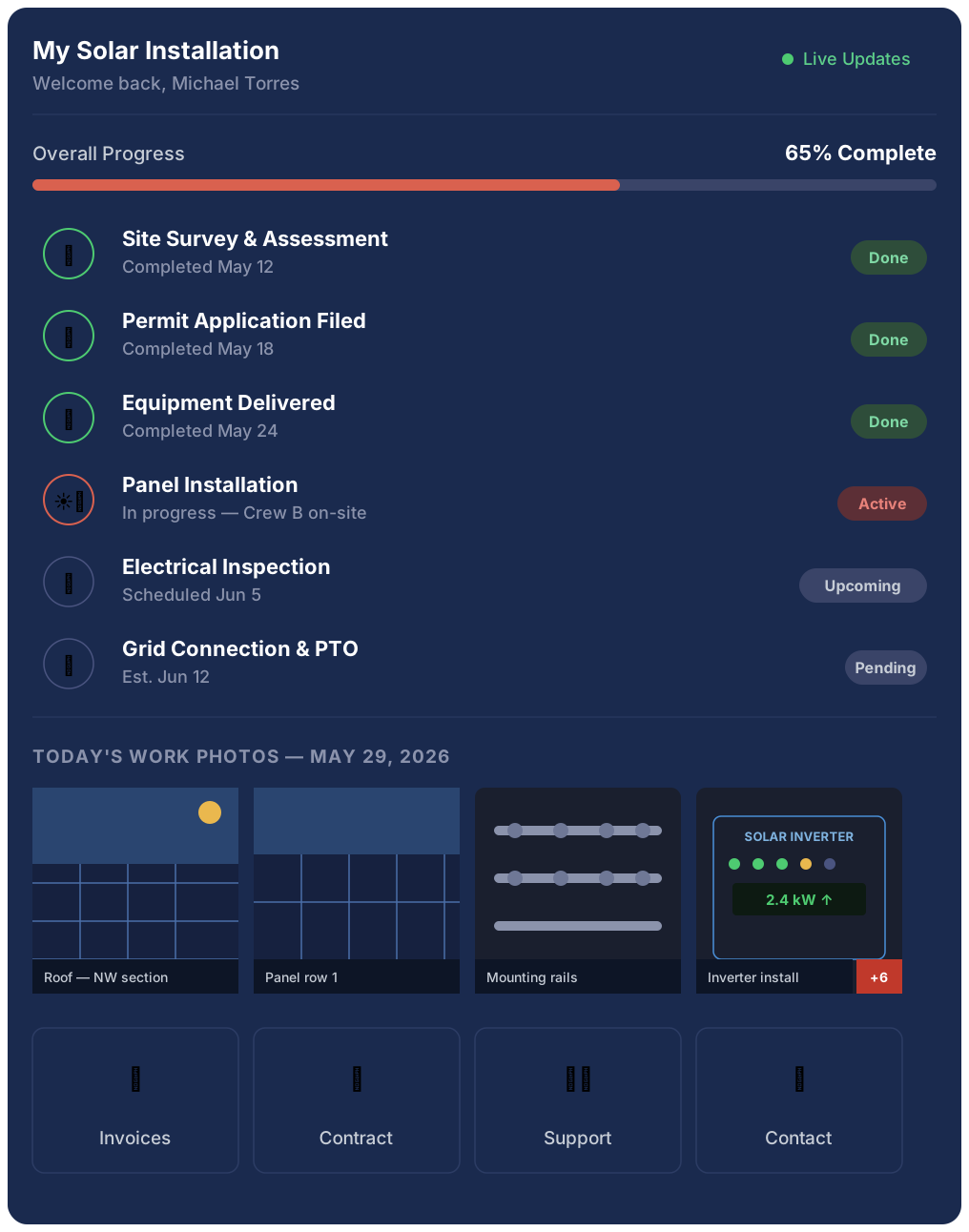
Real-time installation progress tracking

Work photos uploaded by your crew — visible instantly

Download invoices, bills, and signed contracts

Raise and track support tickets

Branded with your company name and logo

My Solar Installation
Welcome back, Michael Torres

Live Updates

Overall Progress65% Complete
🏠
Site Survey & Assessment
Completed May 12

Done

📋
Permit Application Filed
Completed May 18

Done

📦
Equipment Delivered
Completed May 24

Done

🔆
Panel Installation
In progress — Crew B on-site

Active

🔍
Electrical Inspection
Scheduled Jun 5

Upcoming

Grid Connection & PTO
Est. Jun 12

Pending

Today’s Work Photos — May 29, 2026

Roof — NW section

Panel row 1

Mounting rails
SOLAR INVERTER2.4 kW ↑

Inverter install+6
📄
Invoices
📑
Contract
🎫
Support
📞
Contact
80%
Reduction in “where’s my install?” calls
4.9★
Average customer satisfaction rating
100%
Branded as your company — not SaaSSolar
0
Extra admin work for your team

What Happens Without a Customer Portal

Solar installations take weeks. Without a portal, customers are left in the dark — and they call your team to find out what’s happening.

📞
Endless “Where’s my install?” Calls
Your office team spends hours every week answering status update calls instead of closing new deals. The same questions, every project, every time.
📧
Documents Scattered Across Emails
Customers dig through email threads to find invoices, contracts, and permits. Half the time they can’t find what they need and call you anyway.
😤
Frustrated Customers = Bad Reviews
Customers who feel uninformed write bad reviews — even when the installation was flawless. Poor communication kills your reputation even when your work is great.
🔁
No Visibility into What Was Done
Customers have no record of what work was completed, who was on-site, or what photos were taken. Disputes are harder to resolve without documentation.
🎫
Support Requests Slip Through
Post-installation issues reported via WhatsApp or phone often get lost. No tracking, no SLA, no visibility — customers feel ignored after the sale.
💬
Referrals Don’t Happen
Happy customers refer friends — but only if they feel looked after. Poor post-sale experience is the #1 reason solar referral rates stay low.

Real-Time Progress — Stage by Stage

Every installation stage is visible in the customer portal the moment your team updates it. From permit filing to final grid connection — customers see exactly where their project stands, in plain language.
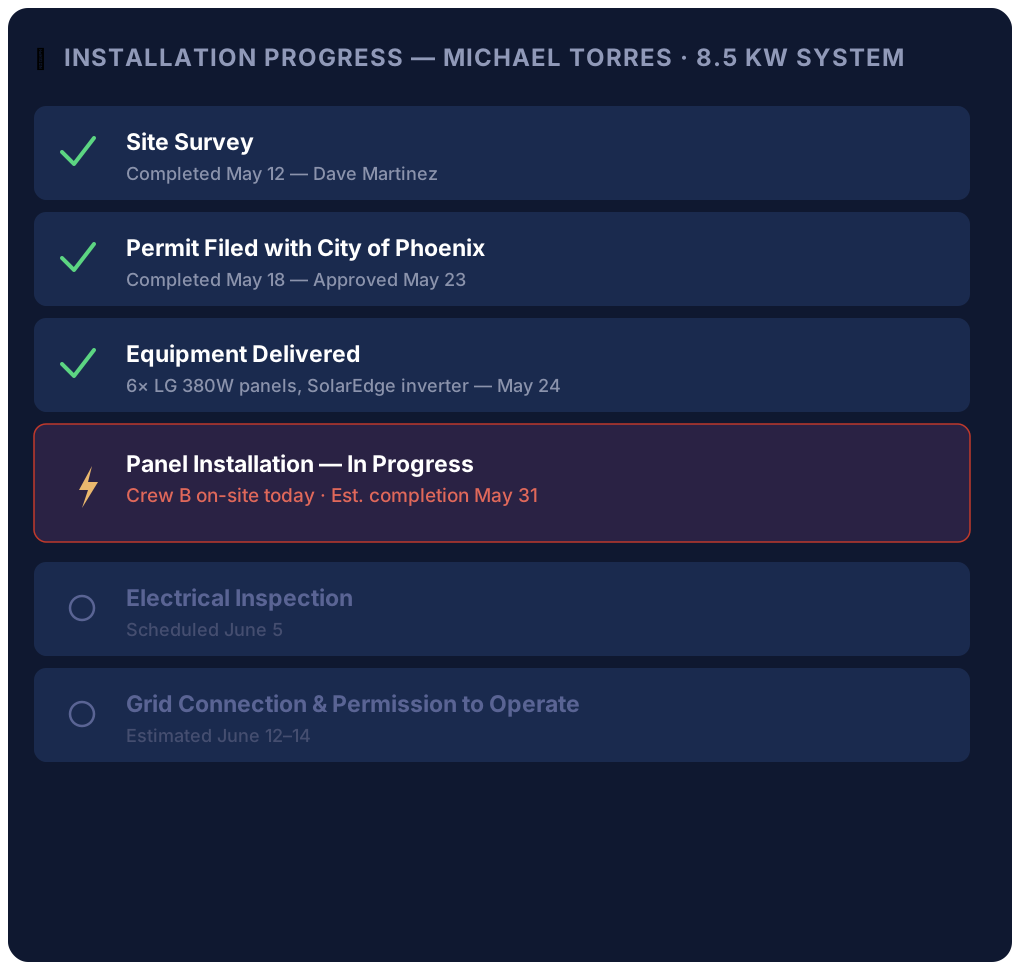
Stage-by-stage progress tracker — shows each phase from survey to PTO, with status and completion dates
Live progress bar — overall percentage complete, updated automatically as your crew logs work
Estimated completion dates — shown per stage so customers know what to expect next
Push or email notifications — customers get notified when a new stage begins or completes
Crew assignment visible — customers see which team is on their job that day
📍 Installation Progress — Michael Torres · 8.5 kW System

Site Survey
Completed May 12 — Dave Martinez

Permit Filed with City of Phoenix
Completed May 18 — Approved May 23

Equipment Delivered
6× LG 380W panels, SolarEdge inverter — May 24

Panel Installation — In Progress
Crew B on-site today · Est. completion May 31

Electrical Inspection
Scheduled June 5

Grid Connection & Permission to Operate
Estimated June 12–14

Work Photos Published Directly to the Customer

When your crew uploads site photos from the field, those photos appear instantly in the customer’s portal. No email attachments, no WhatsApp, no asking for photos after the fact.

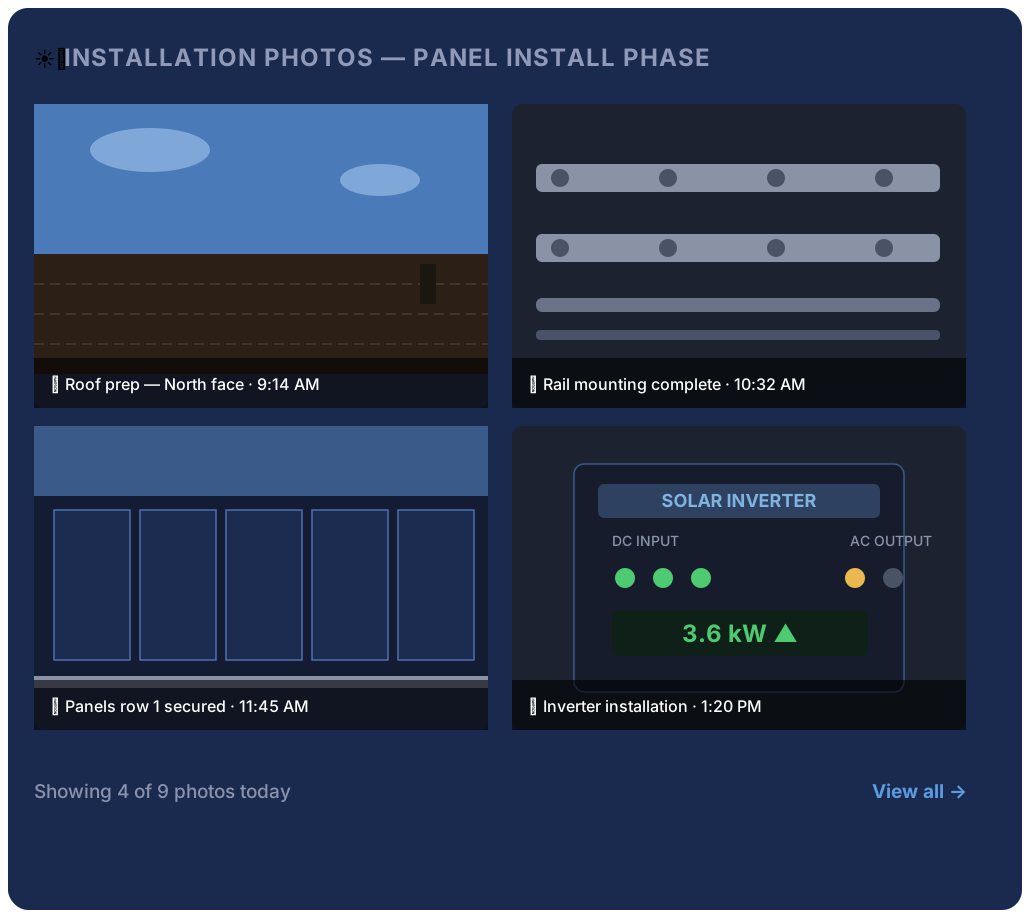
Field photos visible in real time — crew uploads from mobile, customer sees immediately
Labeled by stage — photos tagged to the installation phase (survey, panel install, wiring, inspection)
Downloadable by the customer — they can save photos for their own records or insurance
Before/after documentation — roof condition before and after installation is preserved
Dispute protection — photo timestamp and location serve as a permanent record for your company
📸 Installation Photos — Panel Install Phase

🏠 Roof prep — North face · 9:14 AM

🔩 Rail mounting complete · 10:32 AM

⚡ Panels row 1 secured · 11:45 AM
SOLAR INVERTERDC INPUTAC OUTPUTPWRDCACGRID3.6 kW ▲DCAC

🔌 Inverter installation · 1:20 PM
Showing 4 of 9 photos todayView all →

Invoices, Bills, and Contracts — Always There When Needed

Every document related to the customer’s project lives in their portal. Invoices, payment receipts, signed contracts, permit approvals, and warranty documents — downloadable any time, no hunting through emails.
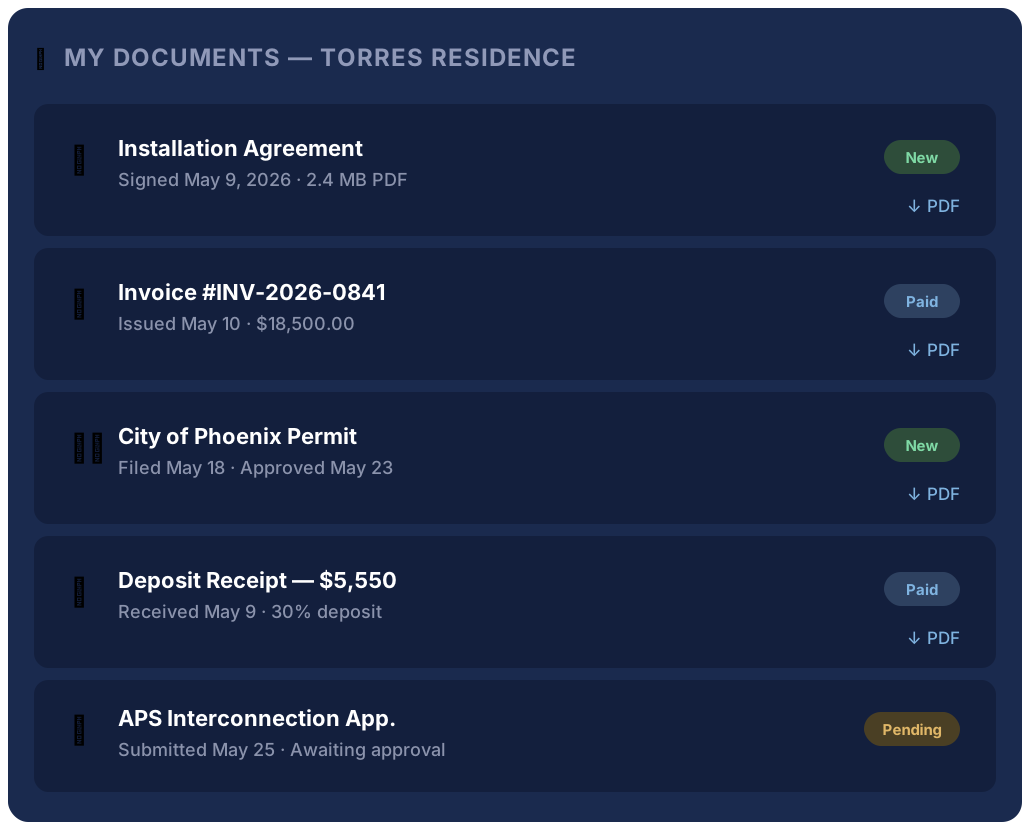
Signed contract PDF — available to download from day one
Invoices and payment receipts — customers see what was charged and what was paid
Permit approvals — uploaded when your team receives them
Warranty documentation — product warranties stored and downloadable years later
Utility interconnection documents — grid connection agreements stored alongside the project
📂 My Documents — Torres Residence
📑
Installation Agreement
Signed May 9, 2026 · 2.4 MB PDF
New

↓ PDF
🧾
Invoice #INV-2026-0841
Issued May 10 · $18,500.00
Paid

↓ PDF
🏛️
City of Phoenix Permit
Filed May 18 · Approved May 23
New

↓ PDF
📋
Deposit Receipt — $5,550
Received May 9 · 30% deposit
Paid

↓ PDF
APS Interconnection App.
Submitted May 25 — Awaiting approval
Pending

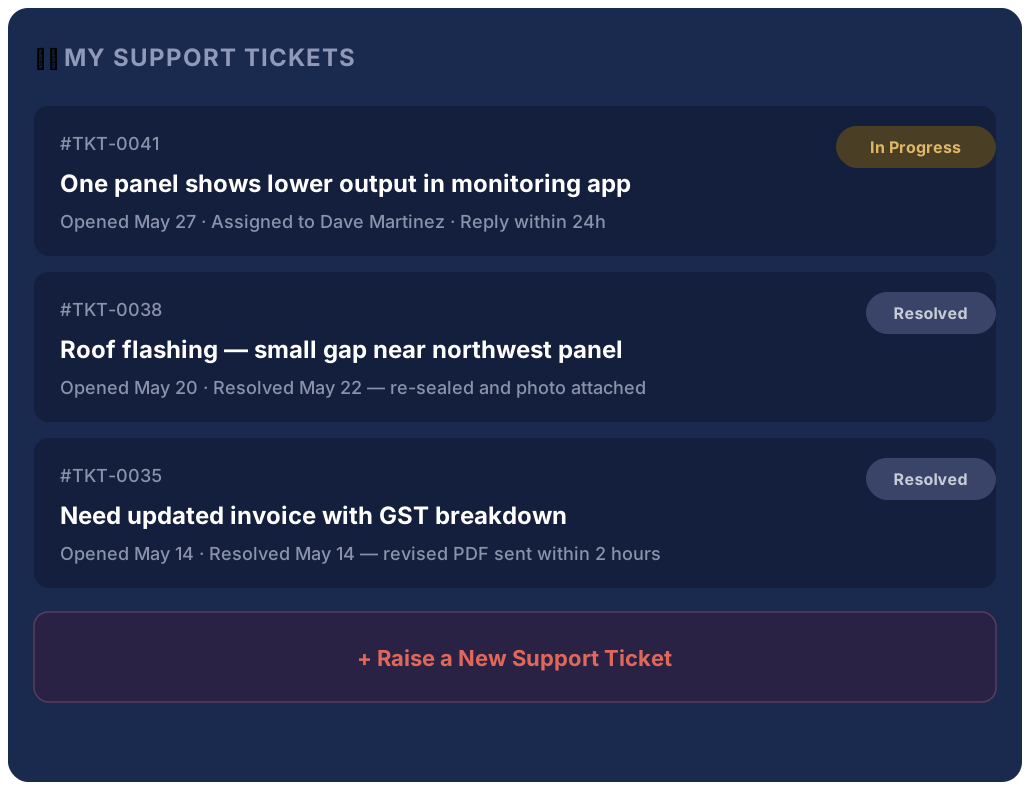
Support Tickets — Raised by the Customer, Tracked by Your Team

Give customers a proper channel for post-installation issues. Every ticket is tracked, assigned, and resolved through your SaaSSolar dashboard. No more issues disappearing in WhatsApp or phone voicemail.

Customer raises tickets directly in the portal — with description, photos, and priority level
Your team sees all tickets in SaaSSolar dashboard — assigned, prioritized, and tracked to resolution
Two-way updates — your team replies in the ticket, customer gets notified automatically
Ticket history preserved — full record of every issue and resolution per customer
SLA visibility — response time targets visible to your team, accountability built in
🎫 My Support Tickets
#TKT-0041In Progress
One panel shows lower output in monitoring app
Opened May 27 · Assigned to Dave Martinez · Reply within 24h
#TKT-0038Resolved
Roof flashing — small gap near northwest panel
Opened May 20 · Resolved May 22 — re-sealed and photo attached
#TKT-0035Resolved
Need updated invoice with GST breakdown
Opened May 14 · Resolved May 14 — revised PDF sent within 2 hours
+ Raise a New Support Ticket

The Business Case for a Customer Portal

It’s not just about customer experience. A portal reduces admin workload, protects you legally, and drives referrals.

01
Cut Inbound Status Calls by 80%
When customers can check progress themselves at any time, they stop calling your office. Your admin team focuses on revenue-generating work instead of repeating the same updates.
02
Protect Against Disputes
Every stage completion, every photo uploaded, every document signed — it’s all timestamped and stored. When a customer claims work wasn’t done, you have proof.
03
Turn Customers into Referral Sources
Customers who feel well informed and well cared for refer friends and family. A portal is the most reliable way to consistently deliver that experience at scale.
04
Branded as Your Company
The portal shows your company name, logo, and colors. Your customers see your brand, not SaaSSolar. It strengthens your identity with every interaction after the sale.
05
Zero Extra Work for Your Team
The portal updates automatically when your team logs activities in SaaSSolar. No separate data entry, no copying updates to a different system — it just works.
06
Better Google and Review Site Scores
Communication is the #1 complaint in solar reviews. When customers have real-time visibility, they rate the experience higher — even when timelines slip.

About the Customer Portal

Does the customer portal show SaaSSolar branding or our company branding?
Your company branding. The portal is fully white-labeled — it shows your company name, logo, and colors. Customers see your brand throughout, which strengthens your company identity after the sale.
How do customers access their portal?
Customers receive a secure login link when their project is created. They can access the portal from any device — desktop, tablet, or phone — without needing to install an app.
Does the portal update automatically or does someone have to enter updates manually?
Automatically. When your team logs a stage completion, uploads photos, or adds a document in SaaSSolar, it appears in the customer’s portal instantly. No separate update process needed.
Can customers download their invoice and contract directly?
Yes. Any document you upload to the project — invoices, contracts, permits, receipts, warranty docs — is available for the customer to view and download as a PDF at any time.
What happens with support tickets — do we need separate software?
No. Tickets raised in the customer portal come directly into your SaaSSolar dashboard. Your team assigns, responds to, and resolves tickets without switching to another tool.

Ready to Give Customers Real-Time Visibility?

Book a demo and see how the SaaSSolar customer portal works for your solar business.

Book a Free Demo →See All Features